Practicing yoga at home has never been more accessible, but without a teacher in the room it is easy to pick up bad habits. Emerging augmented reality yoga apps promise to bridge that gap by overlaying visual guides onto your body and your space in real time. With the right setup, camera angles and safety habits, AR can help you refine alignment, improve mobility and build confidence in your practice without a live instructor.
What is augmented reality yoga at home?
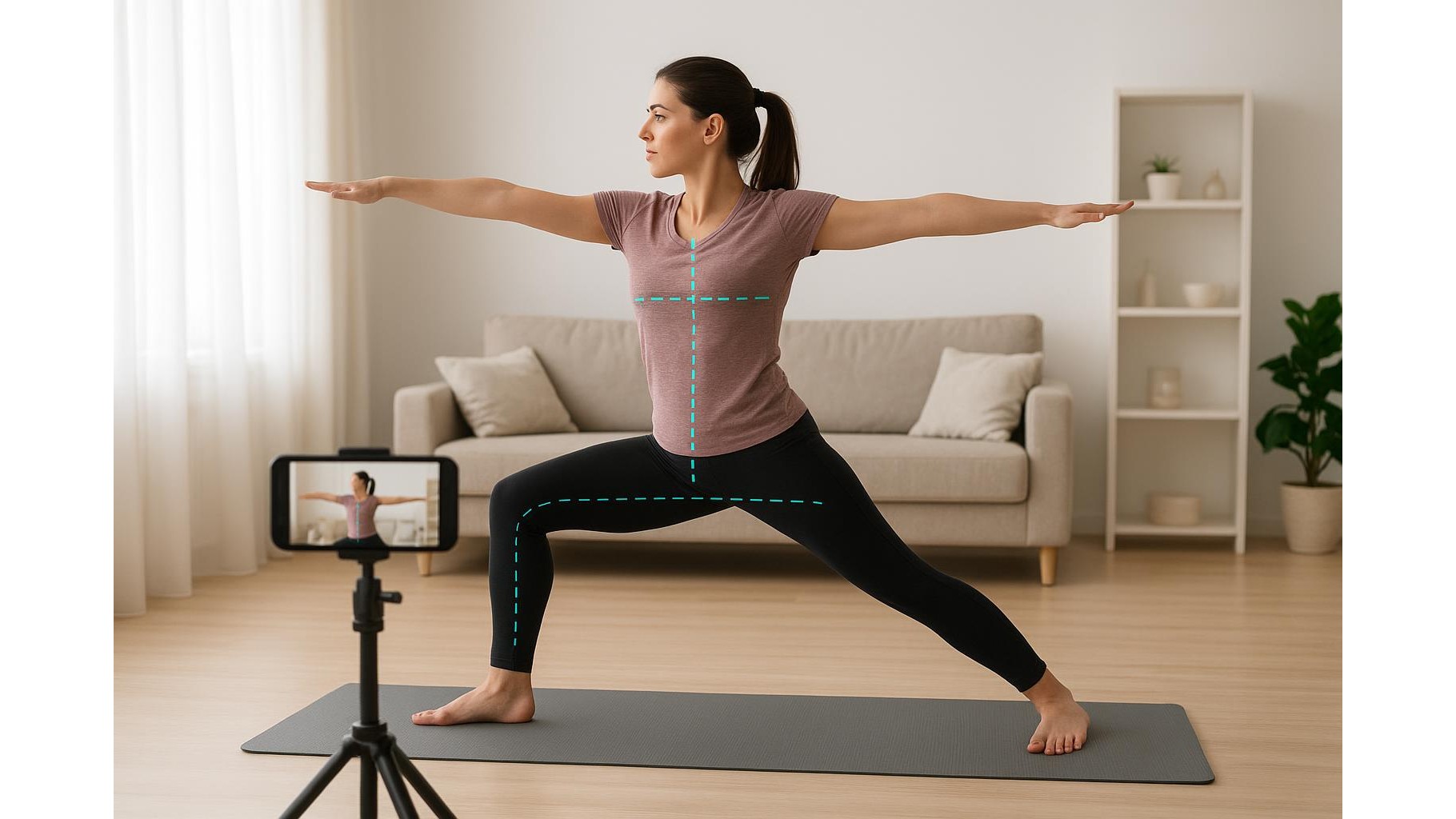
Augmented reality (AR) adds digital elements on top of the real world seen through your phone, tablet or AR glasses. In an AR yoga session, your device camera captures your body as you move, while the app projects lines, arrows or ghost silhouettes that show the ideal pose. Many apps also use on‑device pose detection to highlight misalignments, such as a collapsing knee in Warrior II or a rounded spine in Chair Pose. This turns your living room into a virtual studio where guidance appears directly over your mat, instead of you having to copy a teacher from a flat video. For home gym enthusiasts, AR yoga becomes another smart tool alongside trackers and connected equipment.
Setting up your space, lighting and camera angle
To get accurate feedback from AR, you need a clean visual field. Clear a rectangular zone around your yoga mat, removing low tables and clutter that could confuse the camera. Place your mat perpendicular to a wall so the app can understand depth and orientation. Good lighting is crucial: use diffuse daylight or soft lamps in front of you, avoiding strong backlight from windows that turns you into a silhouette. Position your phone or tablet at about hip height, 2–3 metres from the mat, angled slightly downward so your whole body is in frame when you stand and when you lie down. Mark that tripod spot with tape so you can quickly recreate it in future sessions. Consistent camera framing dramatically improves alignment tracking.
How AR visual cues improve alignment and body awareness
The main advantage of AR yoga apps over standard videos is their immediate, visual feedback. Instead of generic verbal cues, you might see a line overlay tracing your spine and turning red when you round too far, or arrows indicating that you should draw your shoulders away from your ears in Downward Dog. Some apps show a semi‑transparent “ideal” pose for you to match, while others highlight joints so you can spot asymmetries between left and right sides. This kind of real‑time alignment guidance trains your proprioception: you begin to connect how a pose feels with how it actually looks on screen. Over time, you can rely less on the device and more on internal cues, but at the beginning AR acts like a patient, always‑on mirror that speaks the language of angles and lines rather than vague corrections.
Practical tips to make AR yoga part of your home routine
To get real benefit, treat AR‑based yoga as a structured practice, not a novelty. Start with shorter sessions—15 to 20 minutes—focusing on foundational poses such as Mountain, Warrior series and simple hip openers. Use the app’s alignment feedback deliberately: pause when you see a correction, adjust slowly, and notice the difference in muscle engagement and breath. Consider saving screenshots of tricky poses to track your progress over weeks. Combine AR sessions with occasional non‑AR flows so you do not become dependent on the visuals. If your app offers difficulty levels, stay conservative at first; accurate alignment in simpler poses builds the strength and mobility you need for more advanced asanas later. Treat the technology as a coach, but keep your attention anchored in your body and breath.
Safety, limitations and when to seek live guidance
While AR yoga at home is powerful, it is not a substitute for medical advice or one‑to‑one teaching, especially if you have injuries or chronic pain. Alignment overlays cannot fully assess joint health, fatigue or subtle compensations. Always move within a pain‑free range and avoid forcing yourself to match the on‑screen “ideal” at all costs. If the app flags recurring issues—for example, one knee consistently drifting inward in lunges—consider booking a few online sessions with a qualified teacher to address the root cause. Remember that camera perspectives can distort angles; a pose that looks slightly off on screen may actually be safe from another view. Use AR corrections as informative suggestions, not rigid rules, and prioritise stability and smooth breathing over aesthetic perfection.
Bringing AR yoga into your long‑term home fitness plan
Integrated thoughtfully, augmented reality yoga can become a cornerstone of a smart home gym, sitting alongside strength training and cardio. The technology excels at teaching alignment, refining technique and helping you notice subtle details that traditional follow‑along videos often miss. With a clear practice area, sensible camera setup and a safety‑first mindset, AR apps turn your living room into an interactive studio that grows with you. Over time, the on‑screen lines and cues will become less necessary as you internalise healthier patterns of movement. Used this way, AR yoga is not just a digital trend but a practical tool for building a more aware, resilient and sustainable home practice.