AI is quietly reshaping home strength training. New apps promise real‑time form checks, rep counting and coaching using only your phone or laptop camera. Used well, these tools can highlight obvious posture errors, keep you consistent and make solo lifting safer. Used badly, they can distract you from progressive overload and good programming. This guide explains what today’s AI form‑check apps can really do, how to set up your camera, what to ignore, and how to plug them into an existing workout plan instead of replacing it.
How AI form-check actually works at home
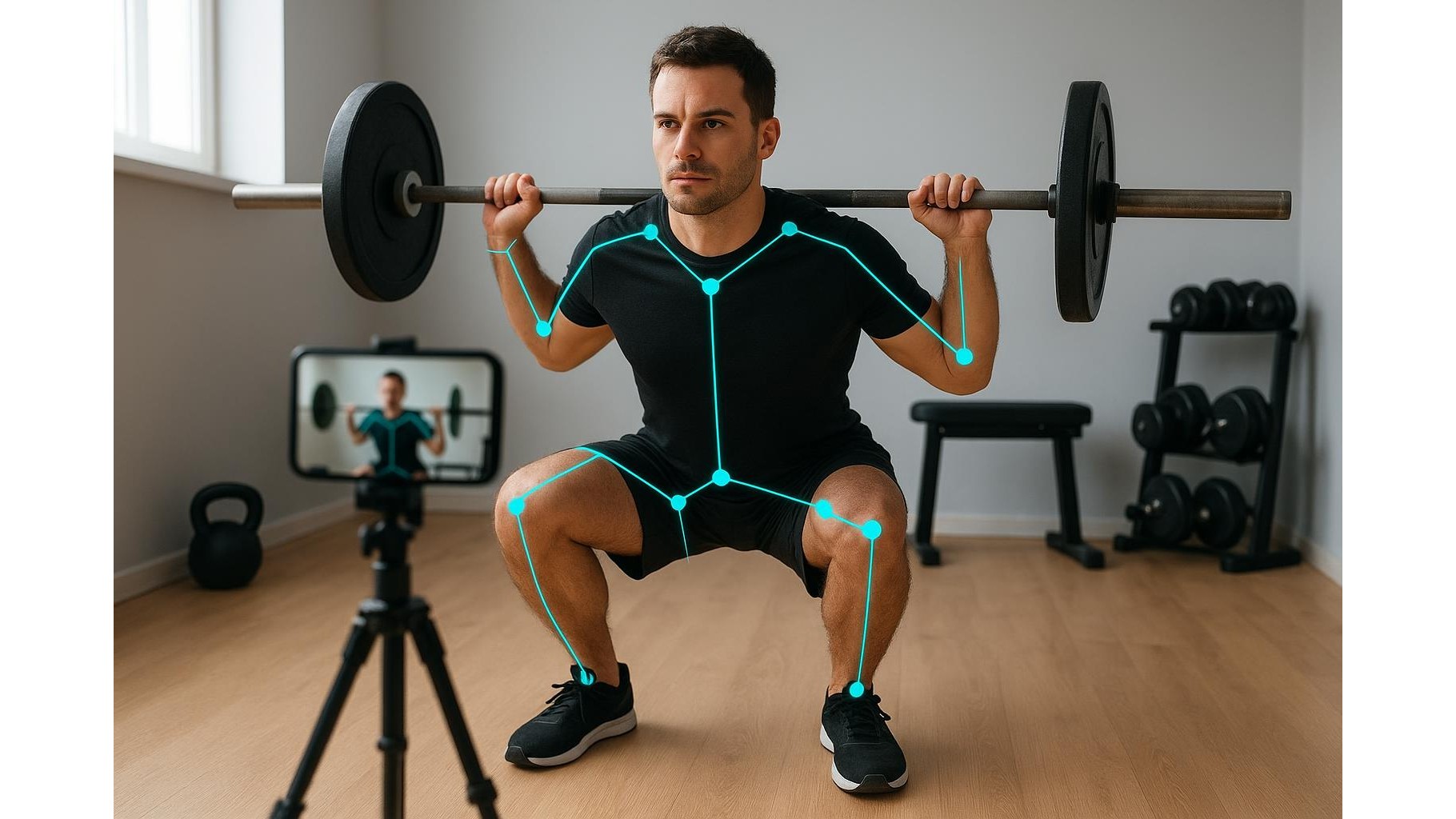
Most AI posture apps use your camera to build a stick‑figure skeleton from key joint positions (shoulders, hips, knees, ankles). The software then compares your angles and movement patterns to its internal models for a given exercise. When you squat, for example, it may flag excessive knee valgus, lack of depth or a rounded lower back. This can be helpful for beginners who train alone and have no coach or lifting partner. However, these systems are still limited: they often struggle with unusual body types, unconventional but safe technique variations, and heavy loads that naturally change bar speed and bar path. Treat every on‑screen warning as a prompt for curiosity, not as absolute truth. When in doubt, cross‑check video of your lifts with trusted educational resources or a qualified coach.
Camera setup, lighting and angles that AI can understand
Even the best AI form-check app is only as good as the images it receives. For compound lifts like squats, deadlifts and presses, aim for a 45‑degree angle from the front or side so the software can see both depth and bar path. Place your phone or laptop at roughly hip height, far enough away to capture your full body and the barbell or dumbbells without cropping. Good, even lighting is essential: strong backlighting or dark rooms cause tracking errors and false warnings about posture. Avoid loose clothing that hides joint positions; fitted shorts or leggings and a T‑shirt work best. Before heavy sets, record a warm‑up set to confirm that the app is correctly identifying joints and reps. If tracking is inconsistent, prioritise fixing the camera angle over chasing a higher ‘form score’ inside the app.
Privacy, data sharing and sensible app permissions
Because posture analysis apps rely on video, you are effectively recording yourself in your home gym every session. Before you commit, read the app’s privacy policy and check whether videos are processed locally on your device or uploaded to the cloud. Disable unnecessary social features that auto‑share clips or leaderboards if you prefer to keep training private. Use strong, unique passwords and enable two‑factor authentication where available. Think carefully before granting access to your full photo library or contacts when the app only needs the camera and microphone. If you train in shared spaces, angle the camera so it does not capture other people without consent. A good rule: if you would not be comfortable with a training clip accidentally going public, avoid recording it or immediately delete it after reviewing your form.
What these apps are good for, and what to ignore
Used intelligently, AI strength training apps excel at a few specific tasks. They are great for building awareness of obvious technique flaws, enforcing consistent range of motion and keeping rough logs of sets and reps. They can nudge you to brace better, keep your heels down in squats or avoid rounding your back on deadlifts. However, do not let an algorithm dictate your entire progression model, exercise selection or deload timing. Ignore superficial metrics like ‘style points’ or arbitrary scores that do not correlate with strength or hypertrophy gains. Pain, fatigue, joint irritation and long‑term progress still matter more than a green checkmark on your screen. If an app repeatedly flags ‘bad form’ for a movement that feels strong, pain‑free and has improved over months, treat it as a starting point for investigation, not a reason to overhaul your technique overnight.
Integrating AI form-check into your existing program
The smartest way to use AI form-check tools is as a supplement to a solid training plan, not a replacement. Keep your primary program built around proven principles: progressive overload, adequate volume, recovery and exercise choices that suit your goals. Then layer the app on top. For example, film the top set of each main lift two or three times per week and review for consistent bar path and depth. Use the app’s rep counting on accessory work so you can focus on effort instead of tallying reps. Periodically save clips of your technique to compare across training blocks. When the app flags issues, note them in your log alongside RPE, load and how the set felt. Over time, you will see patterns that matter—such as technique breaking down only when you undersleep or push sets too close to failure—and you can adjust programming accordingly.
In the end, AI-powered form-check apps are promising tools for home lifters, provided expectations stay realistic. They can sharpen your technique, make solo sessions safer and add structure to your logging, but they cannot replace good coaching, sound programming or honest self‑assessment. Focus on camera basics, protect your privacy, and treat every on‑screen cue as one more data point rather than a verdict. Combine these tools with a thoughtful strength plan and you will get the best of both worlds: the convenience of technology and the timeless effectiveness of progressive, well‑executed training.