Transforming an old tablet into a dedicated home workout screen is one of the easiest upgrades you can make to your home gym. Instead of squinting at your phone or dragging a laptop around the house, you can fix a tablet in one spot and use it as a permanent hub for fitness apps, timers, music playlists and form-check videos. With just a wall mount, a power cable and a few app tweaks, your dusty device can become the digital coach of your training corner.
Choose the right spot in your home gym corner
Before mounting anything, decide where your workout tablet should live. Ideally, the screen should sit at around eye level when you’re standing and still be visible when you drop into push-ups or floor core work. Avoid direct sunlight, which makes the display hard to read, and keep it far enough away from racks and dumbbells so it won’t get hit. If you train in a garage or multipurpose room, pick a wall near a socket so you can leave the tablet plugged in for long sessions. Think about your main training style: if you lift with a rack, centre the screen on the rack; if you follow HIIT workouts in open space, place it where you usually stand so you’re not constantly twisting to see the video.
Mount the tablet securely for hands-free workouts
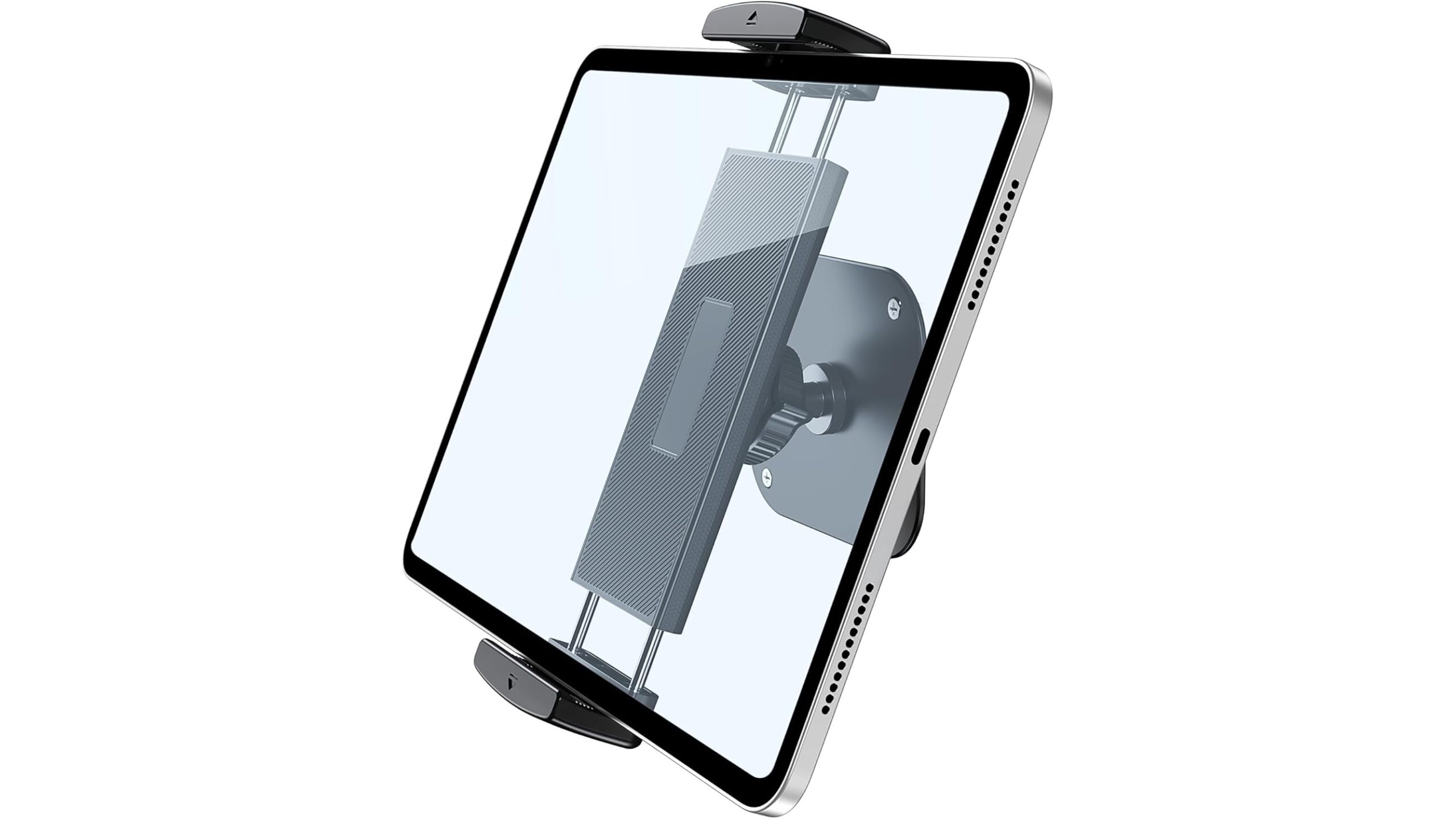
To truly turn your old tablet into a fixed workout hub, you need a solid wall mount. A versatile option is the Tablet Wall Mount, Aluminum iPad Wall Mount Holder, 360° Rotation Adjustable. This mount uses a metal base and a strong clamp to hold devices from 4.7″ to 13″, covering most iPads, Android tablets and even larger phones. The 360° rotation lets you quickly flip between portrait (for tracking apps) and landscape (for workout videos) without taking the tablet out. Its anti-slip rubber pads help prevent scratches and stop the device sliding, even when you’re smashing burpees nearby. Since it screws into the wall, it’s sturdy enough for busy home gym spaces like garages, small fitness corners and even commercial-style setups.
Set up power, Wi-Fi and screen settings
Once the mount is in place, run a charging cable from a nearby socket to keep the tablet permanently powered. Use cable clips or a slim trunking to route the wire neatly along the wall so it doesn’t become a tripping hazard during workouts. Make sure your Wi-Fi signal is strong in that area; if streaming videos lag, consider a mesh extender or moving your router. On the tablet itself, turn on Do Not Disturb so calls and notifications don’t interrupt your sessions, and increase the screen timeout or enable a “screen always on while charging” option if available. Reduce screen brightness just enough to protect your eyes but still keep movements clearly visible when checking exercise form.
Install workout apps, timers and playlists
Now it’s time to load your new home workout screen with the right software. Install your favourite fitness apps for strength, HIIT or yoga, and log in so your programmes sync. Add a dedicated interval timer app for EMOM and Tabata work, and pin it to the home screen for fast access between sets. Music matters for motivation, so set up playlists on your chosen streaming service and create categories like “Heavy Lifting”, “Cardio” and “Mobility”. Use YouTube or subscription services for form-check videos—save key technique clips (squats, deadlifts, presses) into a favourites folder so you can quickly review them between sets without endless searching.
Customize a dashboard for quick training access
To make your old tablet feel like a true workout hub, customise the home screen as a simple, distraction-free fitness dashboard. Remove non-essential apps and only keep shortcuts to your training log, workout library, timer, music and video platform. Arrange them in the order you use them: for example, program app on the top left, timer next, then music and video. On some devices you can add widgets for quick timer start or now-playing controls, so you can make changes with a single tap between sets. Consider setting a motivational lock-screen or wallpaper with your training goals to remind you why you set up this dedicated home gym screen in the first place.
Keep the tablet safe, clean and updated
A home gym environment can be tough on electronics, with sweat, chalk dust and temperature changes. Wipe the screen and mount regularly with a soft cloth to prevent grime build-up that reduces visibility. If your training space is humid, ensure there’s some airflow and avoid mounting directly over radiators. Use a simple protective case on the tablet for an extra layer of impact protection, even though it’s fixed in the mount. Finally, keep the operating system and key apps up to date so you benefit from security patches and new features like improved workout analytics, casting options or better video playback performance.
With a sturdy tablet wall mount, constant power and a curated set of fitness apps, your old device can evolve into a powerful home workout screen that anchors your training space. Instead of lying forgotten in a drawer, it becomes a dedicated station for following programmes, tracking progress, timing intervals and reviewing lifting technique. This small, low-cost upgrade helps your home gym feel more like a professional studio and keeps your focus exactly where it belongs: on better, more consistent workouts.