Training alone in a home gym no longer has to mean guessing your technique. Today’s AI coaching apps can analyse your movements in real time using just your smartphone camera, flagging knee valgus, rounded backs or shallow squats as you lift. With the right setup and a few smart accessories, you can turn your phone into a low‑budget motion‑capture coach that helps you lift safer and progress faster, even when you do not have a PT watching every rep.
Dialling in your camera setup for clean AI feedback
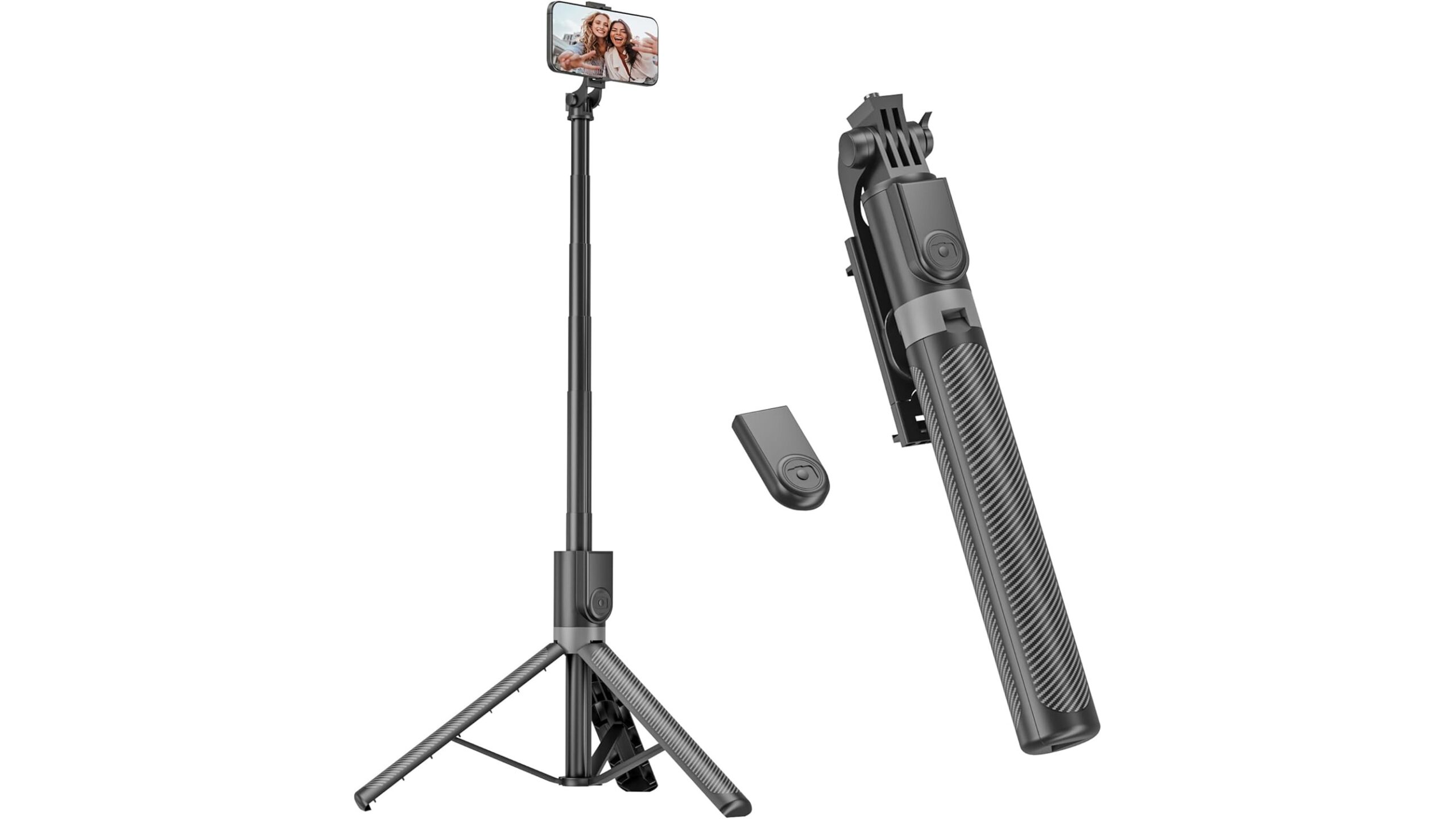
AI apps are only as good as the video angle you feed them. For compound lifts like squats, deadlifts and presses, you want a clear side or 45° view from hip to head, with your whole body in frame and no heavy backlighting that turns you into a silhouette. A tall, stable tripod makes this much easier than propping your phone on a dumbbell. The Phone Tripod & Selfie Stick, 180cm Aluminum All in One Extendable Tripod for Smartphone reaches up to 180 cm, so you can quickly match camera height to your movement pattern and switch between floor lifts and overhead work without re‑stacking boxes or benches. Its Bluetooth remote lets you start recording or app sessions from the rack, so you are not walking back and forth between sets.
Locking in consistent framing with wall‑mounted holders
If you always train in the same spot, a fixed wall‑mount phone holder can give you repeatable angles that AI models love. Apps learn your patterns better when your distance, height and angle stay similar session after session. A simple transparent mount like the 2Pcs Wall Mount Phone Holder Transparent Wall Phone Holder for Bed can double as a clean charging station and a stable filming point opposite your rack or platform. Mount it roughly chest‑height and a few metres back: high enough to capture hip and shoulder alignment, far enough for full‑body lifts. Because it is clear plastic, it blends into the room and will not distract you mid‑set.
Choosing and using AI coaching apps intelligently
Most AI workout coach apps work by tracking joint positions and bar paths from your camera feed. When you give them a stable, well‑lit shot, they can highlight asymmetries, depth issues and tempo errors in real time or immediately after your set. To get the most from them, treat them like a form‑check partner, not a dictator: cross‑check their cues with trusted technique resources, and prioritise big rocks such as neutral spine, bracing and knee tracking instead of chasing a “perfect” angle for every rep. Use saved clips to build a library of your main lifts over weeks, so you can see if AI‑flagged weaknesses (like hip shift in squats) are actually improving with the accessory work you add.
Limits of AI form checks and when video still wins
Even the best AI lifting coach is working with 2D data and guesses about your anatomy. It cannot feel joint pain, spot subtle bar misloads, or fully understand fatigue and previous injuries. Fast, explosive lifts, occluded body parts and baggy clothing can all trick the model. That is why old‑school video review is still essential. Record key sets in a way that is easy to scrub through, then watch them back in slow motion between sessions. Pair AI annotations with your own notes on how each set felt. When something looks off and the app does not flag it, send that clip to a qualified coach or physio for a one‑off technique review. Think of AI as a 24/7 assistant; real coaches and your own critical eye remain the final authority.
Privacy, data and staying comfortable on camera
Filming yourself in a home gym means capturing not just your lifts but also your living space. Before you commit, check each app’s privacy policy: does it process video locally on your device, or upload to the cloud for analysis and model training? Turn off auto‑upload to public feeds, obscure anything personal in the background and use separate training clothes you are happy to see on screen. Where possible, choose apps that allow on‑device processing and encrypted backups. At home you control the environment, so close doors, angle the camera away from windows and avoid capturing family members or housemates in the background. A clean, minimal filming zone not only protects privacy but also makes AI tracking more accurate.
Building a smarter, safer solo training habit
Used well, AI coaching apps can turn a solo home gym session into a coached experience: your tripod and wall mount keep framing rock‑solid, your phone becomes a feedback hub, and each set generates objective data you can act on. Respect the tech’s limits, protect your privacy and keep developing your own technique eye through regular manual video review. Over time, the combination of smart hardware, thoughtful app use and occasional human coaching can give you the best of both worlds: the convenience of training alone, with form standards that would make any in‑person trainer proud.